Showing posts with label Art Animation. Show all posts

Thursday, March 12, 2015

Paint Shop Pro Tips

This was taken from an email sent to me from a Paint Shop Pro user group.
It will help you fix some of the errors you receive after running the program over a long period of time.


Resetting PSP to default.

Resetting PSP to default (deleting PSP's registry) can fix many problems within PSP, errors caused by a corrupt registry missing or greyed out tools and other irregularities.
The big draw back from resetting is the loss of custom settings you have made and having to redo the preferences. To delete and re-write PSP's registry (reset defaults) do the following:
Go to START/PROGRAMS/Jasc Software Inc/ PAINT SHOP PRO 7. Immediately after you click on the PAINT SHOP PRO 7 icon press and hold CTRL+ALT on your keyboard.
Paint Shop Pro will ask you if you would like to delete the registry settings for Paint Shop Pro. Select YES.
When Paint Shop Pro opens it will have all the restored features of initial installation.

Freeing space in the PSP Program Folder.
When you applied the PSP Patch 7.02 , Version 7.02 created a backup of version 7 in a folder called Unpatch ( C:\Program Files\Jasc Software Inc\Paint Shop Pro 7\Unpatch folder)
The same would apply if you installed the 7.04 patch, a back up of 7.02 would have been created. If you have ran PSP patched versions with no problem then it is unnecessary to keep this folder on your hard drive.
You can copy it to a cd for safe keeping if you like and delete the Unpatch folder, reclaiming up to 62 mgb of disk space.

Freeing memory

Lower the "undo" storage for files
File/Preferences/General Program Preferences, hit the Undo tab and set the undo storage to 15 MB.
If you are working with large graphics and use the undo frequently you may need to set it to 40mgb.

Browser Caches
PSP creates a browser cache when using the browse function in PSP. This enables faster loading of graphics. However if graphics are moved around, stored elsewhere or deleted the browser cache remains the same size and can get very large taking up valuable space. It is advisable to delete them frequently to allow a build of a fresh cache in your files. To do this go to Find files and type in "jbf" without the quotation marks. You will see all the pspbrwse icons appear. Select them all and press delete on your keyboard. The next time you browse in PSP new caches will be built.

Autosave

When PSP crashes or freezes for some reason and you haven't saved your work, you can lose everything,
Go to File > Preferences > Autosave settings.
This will open the Autosave Settings dialogue box, Tick the 'Enable Autosave' box. Set the time schedule you require, 5 minutes should be sufficient. Click OK. Autosave is now enabled and your work will automatically be saved to the temp file every 5 minutes. If PSP crashes you can re-open and your work will be loaded as before.

Save Worktop

When you save your workspace, you will be saving settings for your toolbar, palettes, also settings for your rulers and grids plus image information including image position in your workspace etc., so that you can return to your project at a later time.
Go To >File > Workspace > Save. The standard "Save as" dialogue box will appear. It will ask you for a file location you wish to save your workspace to. Workspace will be saved in a .wsp format, so you need to give it a name eg: project2.wsp.
Next time you open PSP go to File > Workspace > Load. The workspace will remember the locations of your graphics so it is important that you do not move them after saving the workspace.

Tools greyed out

The majority of tools will only function on a image with a colour depth of 16.7 million colours (24 bit). To restore your image to 24 bit, Go to Colours > Increase Colour Depth > 16 Million. Now all of your tools should be active except the tools that require a selection.

Using Fonts in PSP

Having too many fonts installed on your system can cause PSP to load slower, as it has to load all the fonts. PSP can use any font that is not installed. Open the font file you wish to use, by double clicking on the font icon, and minimize it on your desktop. That font will now show up in the font list in the 'Text' dialogue box.

Screen Shots

If you want to make a screen shot of your work or tools in PSP, or anywhere else on your computer. Press the Print Screen key on your keyboard, right click on your PSP workspace and "Paste as new image" you can then crop your screen shot down to size and use.

Previous File Formats

PSP, by default will want to save all your new images as .psp files, which can be annoying when working mostly with jpg's To avoid this, open the General Program Preferences, hit the Dialogues and Palettes Tab, check the box "Remember last type used in file save-as dialogue".

Floating tool bars/palettes
While working on a project particularly when lasooing an image, the tool palettes tend to get in the way. Just press the tab key on your keyboard to make them disappear and press the tab key once more to make them reappear.

Crop Tool

Make your selection on the graphic, and double click outside your selected area still on the graphic and your picture will crop automatically
Always use the crop tool and not the selection tool to "cut" an image for a clean outline. The selection too tends to leave and edge of white pixels (unless using for a seamless selection)

Sharpen Option

When making a graphic smaller, got to effects > sharpen once, this will bring back the clarity of the pixels that are lost when shrinking the graphic.

Applying Shadow
While the image that you are applying shadow to is surrounded by the selection go to Selections > Modify > Contract and contract by 1 pixel this will prevent a ragged white appearance around the graphic after shadow has been applied.

PSP Colour Palette

For those of you who like to have a range of colours and the hexadecimal value for stationery etc. Got to File > Program Preferences > Make sure the hexadecimal preference box is ticked and untick " use standard Windows colour picker". This will give you a slider bar choices on hues/sat/light and red/blue/green along with other useful information in the colour dialogue box. Which will enable you a far greater range in colours.

Colour Option Effect

This is a very little used option in PSP that enhances the colours of graphics. Effects > Enhance Photo > Automatic Colour Balance.
A nice little tool that allows you to make the colours look warmer or cooler. I find it invaluable.
Likewise the option of Effects > Enhance Photo > Clarify enhances and clarifies the colours.
The effects that are under the tools of "Enhance Photo" are very useful effects and are not restricted to Photo's.
Try them out on your graphics.

Sunday, January 13, 2013

I quick music vid made using Winamp, Milkdrip 2 & WebCamMax

I made a video tonight using Winamp, MilkDrop Visualizations (It comes bundled for free with the free current version of Winamp), and I recorded it with  WebCamMax.

One thing you should know about most screen capturing software is that with just about every program I've used you can not record internal sound from your sound card. What I always ended up doing is record the video and then overlay the sound track onto it. WebCamMax allows you to use systen sound and that's good because of syncronization between the sound and scenes.

I did this quick version to show you what you can do with next to no costs. I didn't make a production out of it. I just kept it simple and basic.

This is Danielle Dax playing The Evil Honky Stomp.

Wednesday, January 9, 2013

Paint Shop Pro Tutorials made easy using WebCamMax and Medhi plugin filters Free


Last night I went about searching for screen capture/webcam software to make a Paint Shop Pro tutorial with.
Of course I have screen capture software, I must have 10 different programs but none do both and none of them record the sound properly.
In the past I would have to make the video, then play it back and record a sound track while watching it and then use Format Factory to convert the video and add the sound track to it as a layer.
Well I finally found a decent program called WebCamMax that does it all in one straight shot. The vid format is mp4 which is a bonus too. It creates fantastic screen captures for recording events, processes (I haven't tried recording movies with it yet) , it also adds some interesting effects to the webcam side. I don't webcam at all but I do have 4 grandsons that I might like to record some silly stuff for. As far as that goes, there are 100's of nifty little tricks you can use with your webcam for chat or just recording a film type greeting with. Backgrounds ranging from being on a stage to appear in a mirror or other just plain silly things. There are also effects to give you a fat head (I know I'm gonna like that one), silly hats and cartoon type things on the screen with you. I think you can even make your own and import them too.

This is my first shot run. I know the sound isn't up loud enough, but it was my first attempt and I had to test it. Plus it was 3:30 AM and my Lovely Daughter didn't need me making huge noise to mess up her final hours of sleep before going to school.

This is just a basic hand tinting method made using Medhi's Eraser Genuine filter and Paint Shop Pro 7.04. It is a beginners tut and therefore if you know anything about filters and layers you are probably way beyond the scope of this lesson.

Still I share it with you anyway.


Format Factory is 100% Free and by far the best vidio/audio conversion program out there [LINK]
Medhi offers 28 free filters for use with Adobe, Jasc, Corel Products as well as Irfanview, it also is 100% Free [LINK]
WebCamMax can be gotten from here [LINK], Note, if you do buy it buy soon because they are offering a 50% discount "$24.95" for a short period of time. I will delete that last note when I see that the offer has ended
Irfanview is not used in this topic, but I let the name slip and they deserve credit. Irfanview is also free and by far it is the best image viewing, cataloging, converting, web page building, screensaver making, program ever written. For more info on it go to the top of this page and type it into my search field and read my other 2 or 3 posts on it. One will even show you how to make your own Karaoke files using it, another shows how to publish web pages and another is just a features overview. [LINK]

Monday, August 27, 2012

Run pretty much your whole internet from a flash drive

This is My Portable Apps.coms freeware flash drive browser and programs post.

This is my version of a quick walk-through for setting up a flash drive that you can use for most everything from browsing the Internet more safely than from your installed browser on your computer.

Most of the setup is just a straight single download from http://portableapps.com/, a few are add-ons available through Firefox's add-ons.

I'm having a little trouble explaining these progs in simple terms as a group, so instead I'll just list my favorite ones and explain a little about them separately.

First of course is Firefox for browsing. I also have the full version installed on all of my computers and love it, but it has a few drawbacks. The biggest is the fact that it's a memory fiend. I have seen mine use up to 8 or 900 MB ram and even more some times and that's just with it opened and running in the background. I have an Intel 2.2 gigs dual core with 3 GB memory installed that can barely run with Firefox opened on it sometimes because after you used 85% of your computer just to open a page you barely have anything left to run the rest of the computer with and no, I can't just add more memory because Win XP will only see 3 gigs of ram and anything more added will be ignored.

That piece of crap Pentium is the reason I searched for and found this program in the first place.

With Firefox you will notice that some pages load a little slower, but the trade-off is well worth the extra time in page loads. Next I'll try to explain what I think are a few of the advantages to running Firefox off of a flash drive...

No more Internet browser history stored on your computer. This should also mean that bad scripts (Web trackers, spy-ware, browser attacking scripts) should not effect your computer but instead they would be confined to the settings on the flash drive. To take advantage of this fully I set up the flash drive fully and then made a new folder on my Hard drive called "Flash Drive Settings". I then copied all of the files from the drive and placed them into that folders as copies to be used later as a clean install. Now I can just delete everything on the flash drive whenever I want to and copy the files back in as new copies and it's all back to the original again in about 2 minutes.

Some things though like text files, favorites and browser extension settings you may not want to lose the information from, in those cases you can take a snapshot of your settings and just use that to update with and get back your work or settings from, more on that in a minute.

With Firefox I have a couple ad-dons that I'm not sure I could do without. These are ScrapBook Plus and Ant tool-bar.

Scrapbook Plus is a page capture prog and a bookmarks organizer, With it you can select a portion of a page by highlighting it and save it as an offline page or an image, I use that feature for registration codes for purchased programs and receipts for purchases like items bought on Amazon.
The way you would back up or save settings from ScrapBook is to click View in sidebar and from there select Import/Export settings and select Export all, later you just import that file again and every-thing's set back to the way you had it before. Here is the link for ScrapBook Plus "https://addons.mozilla.org/en-US/firefox/addon/scrapbook-plus/"

Ant down-loader is a video/audio down-loader that will snag just about any video out there with just a single click and it runs on very little resources. There are many others out there, but most hog up memory and slow you down to next to nothing when yer trying to do something else while you wait for your movie to download.

This is the download page for Ant down-loader http://antcom-video-downloader.en.softonic.com/, you can get it there or even easier, you can just type in ant.com into the plug-ins search in Firefox and grab it that way and that's how I get it usually.

After all of that we get to the programs.

There are tons of games and apps, I did grab Cribbage, but it's not that great. There are a lot of others too like Solitaire and some other java-script games. I don't bother with those much though.

Here are a few that I consider to be "Must Have" programs and a word or two about them

Notepad ++. It's what I'm typing this on right now... LOL
This program runs on next to nothing, but includes everything. It has spell check and many features that you may not realize you need until you try them. One thing it can do is replace a phrase across many pages and do them all in one shot. I use this feature for html editing. It's convenient when making multiple pages that are similar, but with different content, like videos and flash games. I just write out my html with file names like ???.jpg, ???.swf and [New Link].html and change them to fit the actual content intended, like ???.jpg becomes super_mario_thumb.jpg, ???.swf becomes super_mario.swf and the {New Link].html becomes nintendo_home.html to return the user back to the main index section of Mario games.

Another feature of it is you can test out your html in I.E., Firefox, Chrome or Safari to fine tune it or check for browser compatibility

Next is VLC Media Player. VLC is by far the most complete media player out there. It will do so much that I can't get into it all in this post, but a few features are that it will run swf files, almost any media content and it comes with all codecs you need. It will repair damaged or broken video files as long as you have enough of a file for it to read from. It cannot fix files with no content (0.00 MB), nothing can do that.
You can record straight off of it too. This comes in handy if you want to record a film. Just get the Internet web address of the file out of the page properties and copy it, then open it in VLC and click record. It'll record what you want of it in sections or as a whole and from there you can add subtitles or effects or whatever.


Next is Irfanview, that's one of the fastest image viewers. It also supports plug-ins from just about any program out there. FilterFactory offers some nice plug-ins for free and some of those crappy imaging editors have a few nice plugin filters that come with them that you can copy and put into a folder that Irfanview can use to apply effects to your images for free.

A couple more features are it will make web pages for you that offer thumb-nailed views of what you want to share and full screen sub-pages. Here is an example of one I made using gifs I commonly use in pages [My Gif Page]. You can also make screen-savers from your own images and flash files with music added to the background to share as YouTube like video's.

Next is 7Zip free. It will extract zip files along with some other compression file types and you can safe store your data in your own folders to reduce size and you can protect them using password encryption.

Other than that there are a bunch of "just for fun" apps. I kinda like CamStudioPortable for messing around with cam pictures and I'm sure there's more, but I stopped with those because I want to keep this running on an 8 gig drive and I can still import or export to my main programs for doing the rest of whatever else I might want to do.

LOL, here's my pic on Cam Studio...


All in all I think that it's great to have everything all contained on one flash drive that I can stick into my pocket and use safely on any other computer and not have to rely on remembering personal settings or passwords or links or whatever, makes sharing some of the more interesting stuff a lot easier too.

Wednesday, September 28, 2011

Trouble making a video...Cyndi Lauper - Time After Time

This is not a great version. It's a screen cap of a high definition of one I'm trying to make.

I "borrowed" this song because it's beautiful, but not so much to make a music vid with.

I am trying to make a template with layers, frames and transitions in high definition. I'm working on an AMD AM2, 3 Ghz with 4 Gb ram, and it should be more than enough, but it isn't. Every time I attempt to join the vid together the programs crash. My settings are 640 X 480 "4X3 format" @ 30 fps. In all cases I re-size everything to those dimensions too before I import my work into the video editor. I also use the same settings for transitions in animated gif and convert those to Divx format.

Something is wrong and some advice would be appreciated [email:FunkingDave@gmail.com], if you have any to offer.

I'm using Paint Shop pro X3 and X4, also Pennacle Studio 14, VideoSpin, DebugMode Wax 2.0 and trying out a few others.

My ambition is to make a full length film introducing highlights of current social trends and changes in government, in order to introduce others to access to find more information on a wide range of topics that I have found to be very interesting.

I hope you enjoy this video and I hope Cyndi Lauper doesn't get offended over me using it for this stage of my studying. I will search for her name and send her a link to this if I can.

Cyndi Lauper - Time After Time


Thursday, September 8, 2011

Edit, convert, build scenes, make effects, all for FREE from DebugMode

Here to tell you about some fantastic video editing software and it's all FREE from the Satish Kumar at DebugMod.

I really have no idea who he is, but I'd like to chat with him some day. He's putting out some excellent software and he aint in it for the buck. I admire that (I also know he needs some bucks to survive too)

Below I'll give my weak version of an intro into some of his software. Next the page links and at the bottom a few vids that you can watch for a little jump start from the experienced editing artists to get you started.

Wax 2.0 is (as I said) free. It handles many file types (codecs) and even more than that it allows you to decide the output frame sixe. Not many others allow that. It is also pretty fast compared to all the crap I've bought and after installing I notice no change in my computers speed or performance.

WinMorph is an addon for WAX and it also works as a standalone package. After installing, it will see what else you have that it can or cannot work with (you decide if you want the plugins attached to other programs or not). It found my Adobe Premier and CS5,  it also found my Ulead Video Studio 8. I allowed the plugins, but haven't tried them out on the others yet.

The Presets I don't remember how I found, might even be in with the plugins page.

The other two are what I call extra's. FrameServer will allow you to dismantle video content for use in maling animated gifs, scenes or to merge in as transitional effects. I use VLC myself for stealing frames, but I'll try that one out later anyway. Wink is a sort of capturing device. It allows for you to add in buttons and with it you can build swf files, pdf's presentation files and many other choices. It is (as I understand), mostly used for making tutorials. I think I fould find other uses for it as well, but that's getting off-topic.

Beyond that Satish has a few others. I'll look into them later, or you can do it yourself any time you want on his home page [HERE]


EXTRA'S:


How To Add Special Effects To Videos For Free


Green screen effect


NOTE:All of the tutorial vids I shared I got from HowCast, I even joined. There might be other sections on there, but the video how-to's start page is [HERE].

Hope you enjoyed this and pass it on,,,
Funk

Thursday, July 15, 2010

Pigeon: Impossible, from Puppies and Flowers Blog

I found this Animation on Puppies & Flowers blog [Here]. It's funny and cute...

Monday, May 24, 2010

Everybody wants to be in love! (Art type vid)

Share your love with others, because
Everybody Wants To Be In Love


Great find, hosted on Vimeo by SweetToothMusic. Check them out for more.

Wizards (1977), a Ralph Bakshi film


Wizards was a film done by Ralph Bakshi. I first found the characters in a magazine that I collected called Heavy Metal. It was a bit far fetched and a little off the wall but I thoroughly enjoyed it in the mag, so I wanted badly to see the film.

I never did get to see the film when it came out though but recently found it on the internet.


This is a paragraph taken from Wiki's page on the film and it shows a little bit how "far off the wall" the characters were. "Earth has been devastated by a nuclear war instigated by five terrorists, and it has taken two million years for the radioactive clouds to once again allow sunlight to reach the surface. Only a handful of humans have survived, while the rest have changed into mutants who roam the radioactive wastelands. In the idyllic land of Montagar, the true ancestors of man — fairies, elves and dwarves — have returned and live in peace. During a celebration of 3,000 years of peace Delia, queen of the fairies, falls into a trance and leaves the party. Puzzled, the fairies follow her to her home and discover that she has given birth to twin wizards. Avatar, a kind and good wizard, spends much of his boyhood entertaining his mother with beautiful visions, while Blackwolf, a mutant, never visits his mother, but spends his time torturing small animals."

Below is the film posted in parts and in one piece full.

Wizards (1977)

Posted by ErikErikSonyD on his YouTube channel. Click on his top right uploads box or here to see all of his posts and subscribe because the Dude has some decent stuff posted there.


part 1


Part 2


Part 3


Part 4


Part 5


Part 6


Part 7


Part 8


Full vid link is [Here], but in "Save as" or "Open with" format. No viewing screen option. Size is 448 MB, so saving it might work better than buffering it through any viewer

Saturday, May 22, 2010

My own Animated gif...

I don't even know how this will work out but link to it is [here] if this one messes up on me.

I know it still needs some more work but I'm kinda new at it and this is a second run making this one.

Enjoy it or lie and say you did...


Wednesday, May 19, 2010

Sharing some interesting Animated Gifs...

Not much to say except that I have been saving some of these that I consider rather well done and decided to share some. If this post works right then each pic will link back to my Photobucket album containing more and you are welcome to take from there whatever you want. To snag from here just right click on the image and select "save as".

I would have posted more on this post but as it turns out some of these are quite large in file size and I was worried about page loading time. As it is I hope this page doesn't take forever to load. Also some of these are re sized just to fit better on here. If you save anything expect it to either be larger or smaller than as seen in post.

Intense sunset


Blue bolts


Dark city

Sunday, May 16, 2010

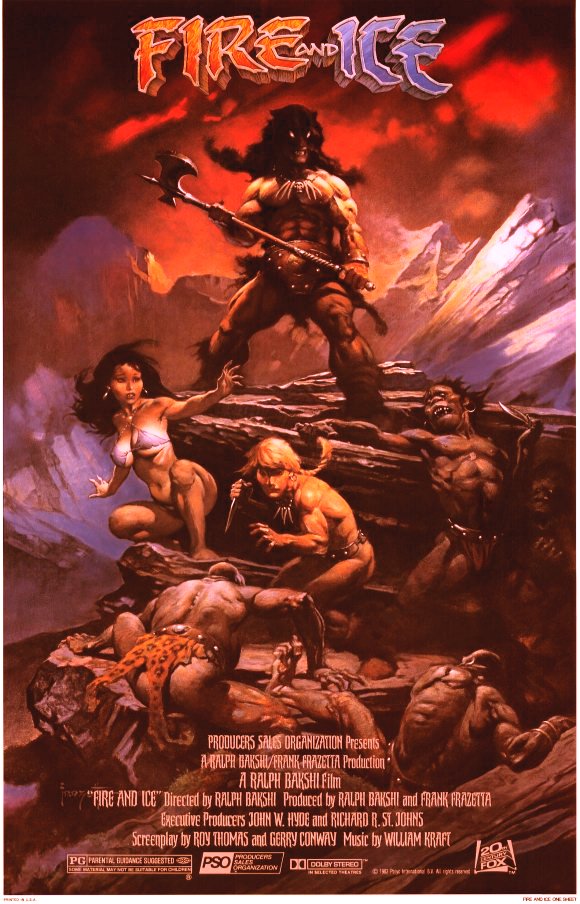
(Film) Fire and Ice by Ralph Bakshi and Frank Frazetta.


Fire and Ice, released in 1983, was a collaboration between Ralph Bakshi and Frank Frazetta, distributed by 20th Century Fox, which also distributed 1977's Wizards. The animated feature, based on characters Bakshi and Frazetta co-created, was made using the process of rotoscoping, in which scenes were shot in live action and then traced onto animation cels.

The screenplay was written by Gerry Conway and Roy Thomas, both of whom had written Conan stories for Marvel Comics. Background painter was James Gurney, the author and artist of the famous Dinotopia illustrated novels. Thomas Kinkade also worked on the backgrounds to various scenes.

Plot:
From their stronghold in Icepeak, the evil Queen Juliana and her son Nekron send forth a wave of glaciers, forcing humanity to retreat south towards the equator. Nekron sends a delegation to King Jarol in Firekeep to request his surrender, but this is a ruse orchestrated by Queen Juliana for Nekron’s sub-humans to kidnap Jarol’s daughter, the barefoot, microkini-wearing Princess Teegra (Queen Juliana feels that Nekron should take a bride to produce an heir). But Teegra makes an escape and comes upon Larn, the only survivor of a village razed by glaciers, who offers to escort her back to Firekeep. As Teegra is recaptured, Larn teams with the mysterious Darkwolf to save Teegra and then travel to Icepeak to stop Juliana. Darkwolf faces Nekron and kills him as Icepeak succumbs to lava released by King Jarol and is destroyed. The film finishes with Larn about to kill a sub-human until Teegra stops him saying that "it's over"; Darkwolf is seen atop a cliff and then disappears. Teegra and Larn kiss as the credits roll.

All of the above was taken from Wikipedia on this page [here] and the following will be taken also from Wiki from their page on Frank Frazetta.

At age eight, Frazetta attended the Brooklyn Academy of Fine Arts,[4] a small art school run by instructor Michael Falanga. "[H]e didn't teach me anything, really," Frazetta said in 1994. "He'd come and see where I was working, and he might say, 'Very nice, very nice. But perhaps if you did this or that.' But that's about it. We never had any great conversations. He spoke very broken English. He kind of left you on your own. I learned more from my friends there."

In 1944, at age 15, Frazetta, who had "always had this urge to be doing comic books", began working in comics artist Bernard Baily's studio doing pencil clean-ups.[4] His first comic-book work was inking the eight-page story "Snowman", penciled by John Giunta, in the one-shot Tally-Ho Comics, published by Swappers Quarterly and Almanac / Baily Publishing Company. It was not standard practice in comic books during this period to provide complete credits, so a comprehensive listing of Frazetta's work is difficult to ascertain. His next confirmed comics work are two signed penciled-and-inked pieces in Prize Comics' Treasure Comics #7 (July 1946): the four-page "To William Penn founder of Philadelphia..." and the single page "Ahoy! Enemy Ship!", featuring his character Capt. Kidd Jr.

Frazetta was soon drawing comic books in many genres, including Westerns, fantasy, mystery, and historical drama. Some of his earliest work was in funny animal comics, which he signed as "Fritz". In the early 1950s, he worked for EC Comics, National Comics, (including the superhero feature "Shining Knight"), Avon Comics, and several other comic book companies. Much of his work in comic books was done in collaboration with friend Al Williamson and mentor Roy Krenkel.

Noticed because of his work on the Buck Rogers covers for Famous Funnies, Frazetta started working with Al Capp on Capp's comic strip Li'l Abner. Frazetta was also producing his own strip, Johnny Comet at this time, as well as assisting Dan Barry on the Flash Gordon daily strip.He married Massachusetts native Eleanor Kelly in New York City in November 1956. The two would have four children: Frank Jr., Billy, Holly and Heidi.

Born Frank Frazzetta in Brooklyn, New York City, he removed one "z" from his last name early in his career to make his name seem less "clumsy". The only boy among four children, he spent much time with his grandmother, who began encouraging him in art when he was two years old. He recalled in 2010, a month before his death,

"When I drew something, she would be the one to say it was wonderful and would give me a penny to keep going. Sometimes I had nothing left to draw on but toilet paper. As I got older, I started drawing some pretty wild things for my age. I remember the teachers were always mesmerized by what I was doing, so it was hard to learn anything from them. So I went to art school when I was a little kid, and even there the teachers were flipping out"

In 1961, after nine years with Capp, Frazetta returned to comic books. Eventually he joined Harvey Kurtzman on the bawdy parody strip Little Annie Fanny in Playboy magazine.

Plenty more to read on Wiki's page [here], also take a look into some of his other artwork. Some of my favorites were Tarzan, Vampirella and his work in the magazines Creepy, Eerie and Heavy Metal.

I bought almost everything I could find on him for over five years and waited for both this movie and Wizards to come out in the theaters only to find myself doing time during their releases and missing both altogether. I have somewhere around here Wizards and may post it if I ever find it again. Until then Please Enjoy this film and share it with your friends like I have with you.

Fire and Ice by Ralph Bakshi and Frank Frazetta, part 1 of 2
[Download here] or watch it below.


Fire and Ice by Ralph Bakshi and Frank Frazetta, part 2 of 2
[Download here] or watch it below.


NOTES:This file was re-sized and converted with FormatFactory for free. The site is [here] and version 2.6 download link is [here]. With FormatFactory you can combine both parts back into one complete file and convert it to almost any format, in any aspect ratio and tweak out some of the settings for sound, like surround for use in a home theater system.

Get VLC Media Player [here] for free to watch seamlessly on a play list just as they are on your PC if you prefer. It is very important for you to only download VLC from the authors site "VideoLan" because there are a few sites out there selling or giving away mock versions of the software just because it is so popular by name.


Thursday, April 8, 2010

Jan Svankmajer vid post...

Sorry but I don't know the name of this vid. It is very good though and I think you're going to like it. Please pay notice to the warnings below both on the post and in the keywords at the very bottom. I would hate to think that this post put someone into therapy for emotional trauma without warning them first.

CONTENT WARNING: This video contains clay breasts (naked ones), images of cornbread and two toothbrushes. Please do not view if any of the above might offend you.

Sunday, January 17, 2010

Bach, 500 years of woman in art

Original post by eggman913

by Philip Scott Johnson

500 Years of Female Portraits in Western Art

Music: Bach's Sarabande from Suite for Solo Cello No. 1 in G Major, BWV 1007 performed by Yo-Yo Ma

Nominated as Most Creative Video
2nd Annual YouTube Awards

For a complete list of artists and paintings visit http://www.maysstuff.com/womenid.htm

High resolution version:
http://www.vimeo.com/1456037

Contact information:
eggman913@gmail.com


Thanx Eggman......

Thursday, December 24, 2009

Fire on high- ELO -Creation version

This video shows the creation of the Earth and the beginnings of life on it. I didn't make this myself but had it kicking around for years. Try to watch it full screen, it will mesmerize you.

Download the vid [here], or watch it below.


Bonus medly. Download the vid [here], or watch it below...

Tuesday, October 27, 2009

How to make a woman look and feel beautiful in about 70 seconds....


I still like the way she looked before he started more tho.
She looked attractive, clean, honest and she better stay out of the rain because when that stuff on her face starts'a runnin she'll look like a wet calico cat.

Friday, October 23, 2009

Queen doin Don't Stop Me Now on Pop Waffle...

This is great, try the box lower on the right of the vid to watch it full screen.

Tuesday, September 1, 2009

Jan Svankmajer - Dimensions of dialogue

Interesting...


More here [LINK].

Monday, August 10, 2009

Foghorn Leghorn Swaggle....

The fine-fine art of swagglin'

Tuesday, July 28, 2009

[Movie] The Forbidden Zone "Temp. Post"


Forbidden Zone is a 1980, a musical comedy film and a little too adult in content for here .... blaa-blaa-blaa,,,


I moved it to another blog that allows more mature content. The link is [HERE]


NO Kids allowed on that site ever!